
The Bulletproof Guide to Defending Offshore Servers Against Multi-Vector DDoS Attacks
When migrating to offshore servers, it’s typically done for reasons such as strict data privacy, censorship resistance, or legal flexibility. However, offshore infrastructure often attracts DDoS Attacks something most providers omit in their marketing material.
Offshore hosting often serves high-risk industries, uncensored media, high-volume streaming, gaming platforms, and crypto-native applications, making it a target for extortion, competitive sabotage, and hacktivism.
If your offshore server goes down, your privacy doesn’t matter. Your freedom of speech doesn’t matter. Your business is just dead in the water.
Satisfying Google’s core system requirements means avoiding surface-level fluff. As a senior infrastructure architect and technical copywriter, I am going to break down exactly how multi-vector DDoS attacks target Offshore Servers, why standard mitigation often fails in offshore environments, and how to build an ironclad defense strategy that keeps your platform online under massive volumetric strain.
1. Why Offshore Servers Are High-Value DDoS Targets
To defend a system, you must first understand its threat model (the set of possible risks or attack scenarios). Why do attackers target offshore infrastructure more aggressively than standard hyper-scaler clouds like AWS or Google Cloud?
The High-Risk Tenant Profile
Offshore data centers operate under legal jurisdictions that ignore frivolous DMCA takedowns or arbitrary censorship demands. While this protects legitimate freedom of expression and alternative financial systems, it also concentrates industries that naturally attract adversaries:
- High-Stakes iGaming & Gambling: Highly competitive fields where rivals frequently launch volumetric attacks to take down competitors during peak betting hours.
- Cryptocurrency & DeFi (Decentralized Finance) Platforms: High-value targets for threat actors trying to disrupt node synchronization (the process of keeping multiple copies of blockchain data up-to-date) or force network lags to execute flash-loan exploits (rapid borrowing and repayment schemes used to manipulate markets).
- Controversy-Driven Media: Political whistleblowers and uncensored journalism sites that state-sponsored actors attempt to silence via persistent application-layer assaults (attacks that target the website or application functionality rather than the network bandwidth).
The Network Location Trap
Many budget offshore hosting providers acquire cheap network transit routes (the paths data travels across the Internet) to keep costs low. Attackers know this. They map the autonomous system numbers (ASNs, which are unique identifiers for networks on the Internet) of prominent offshore data centers and scan for upstream vulnerabilities (weaknesses in networks that provide backbone Internet service), knowing that a massive 400 Gbps (gigabits per second) volumetric blast can easily choke a localized, poorly peered offshore network pipeline.

2. Anatomy of a Multi-Vector Attack on Offshore Infrastructure
Modern DDoS attacks are rarely one-dimensional. Attackers mix network-layer bludgeons (overwhelming the server’s bandwidth or connections) with application-layer scalpels (targeting the functions of websites or applications). If your defense strategy only prepares for one, your offshore servers will crash under the weight of the other.
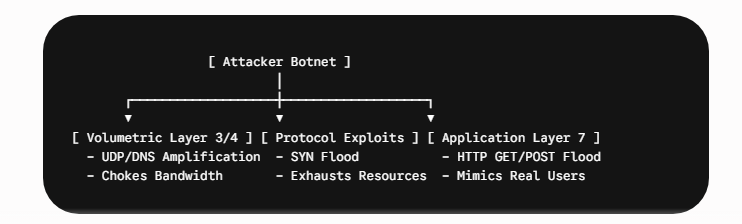
Sector A: Volumetric Attacks (Layers 3 & 4)
These attacks aim to completely saturate your server’s network interface or the upstream carrier’s bandwidth.
- UDP Amplification (DNS, NTP, Memcached): The attacker sends small requests with a spoofed source IP (your server’s IP) to open servers across the internet. These servers respond with massive payloads directed straight at your infrastructure.
- SYN Floods: Exploits the standard TCP three-way handshake. The attacker sends a barrage of SYN requests but never completes the handshake with an ACK response. Your server leaves these connections open, quickly exhausting its connection queue table.
Vector B: Protocol Attacks
Protocol attacks target actual state tables in your firewall, load balancers, or server operating systems. The most common is the Fragmented Packet Attack, which sends malformed or fragmented IP packets that force the target server’s kernel to expend significant CPU cycles reassembling nonsensical data.
Vector C: Application Layer Attacks (Layer 7)
Layer 7 attacks are quiet, sophisticated, and deadly. They do not try to break your network link; they try to crash your application server (Nginx, Apache, or Node.js) by mimicking legitimate human behavior.
- HTTP GET/POST Floods: Requesting heavy database-driven pages repeatedly.
- Slowloris: Opening HTTP connections and sending headers incredibly slowly. This keeps the worker processes on your web server tied up indefinitely, preventing real users from connecting.
3. The Offshore Dilemma: Bandwidth vs. Sovereignty
When mitigating a DDoS attack on a standard corporate site, the typical approach is to route all traffic through a large-scale global proxy network such as Cloudflare or Akamai. However, for a true offshore deployment, this creates a fundamental operational paradox.
The Decryption Risk
If you put a third-party, US- or EU-based proxy CDN in front of your privacy-focused offshore servers, you must hand over your SSL/TLS private keys to that provider to inspect Layer 7 traffic.
The moment a reverse proxy inside a highly regulated jurisdiction decrypts your traffic, your “offshore” privacy status is severely compromised. Subpoena-backed data requests can intercept user data at the proxy level before it ever reaches your secure server in Iceland, Switzerland, or Malaysia.
The Edge-Scrubbing Solution
To maintain absolute data sovereignty without sacrificing uptime, you must utilize an infrastructure model that couples sovereign hardware with BGP Anycast Routing and Inline Hardware Scrubbing.
4. Blueprint for Absolute DDoS Mitigation on Offshore Servers
True resilience requires a multi-layered defense architecture. Here is the operational blueprint for protecting your backend architecture from failure.
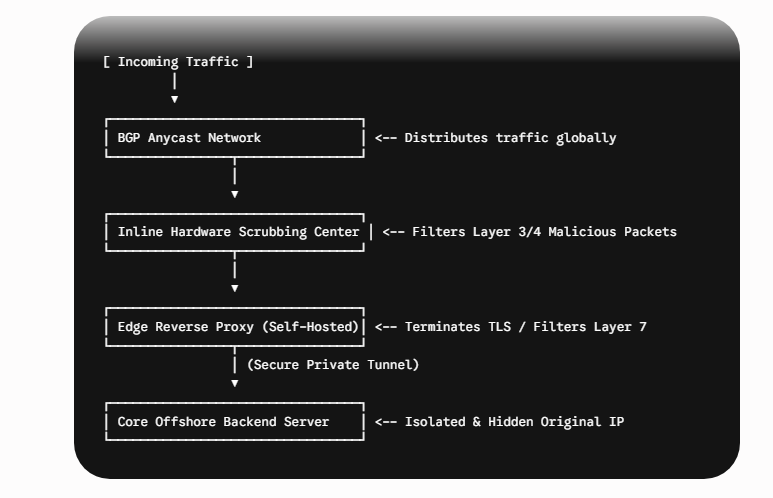
Step 1: Hide the Origin IP (The Prime Directive)
The absolute worst architectural mistake you can make is exposing your offshore server’s true IP address to the public internet. If an attacker knows your origin IP, they can bypass every firewall in the world and blast your server directly.
- Use Private Backend Subnets: Your main application server should reside on an internal private network with no public gateway.
- Deploy Edge Proxies: Place hardened, sacrificial frontend edge nodes in front of your core server. Traffic should only flow from:
User -> Anycast Scrubbing Network -> Edge Proxy -> Private Tunnel (WireGuard/GRE) -> Core Backend.
Step 2: Implement BGP Anycast Routing
Instead of routing all global traffic to a single data center pipeline, work with an enterprise-tier offshore provider that operates a BGP Anycast network.
Anycast assigns the same public IP address to multiple scrubbing centers worldwide. When a botnet in Asia launches a 200 Gbps attack, that traffic is automatically routed to the nearest regional scrubbing center in that specific continent, absorbing and neutralizing the attack locally before it can cross the ocean and overwhelm your primary hosting infrastructure.
Step 3: Hardening the Server Kernel (Linux Sysctl Tuning)
If malicious packets bypass external filters, your operating system must be optimized to discard them immediately rather than waste CPU power.
You can configure these parameters by modifying /etc/sysctl.conf on your Linux-based offshore servers:
# Enable SYN Cookies to prevent connection table exhaustion during SYN floods
net.ipv4.tcp_syncookies = 1

# Increase the maximum number of remembered connection requests (SYN backlog)
net.ipv4.tcp_max_syn_backlog = 20480

# Reduce the number of times the kernel retries a SYN+ACK reply
net.ipv4.tcp_synack_retries = 2

# Increase the maximum number of open files and system file descriptors
fs.file-max = 2097152

# Enable time-wait reuse for rapid socket allocation
net.ipv4.tcp_tw_reuse = 1

# Maximize the local port range for outgoing connections
net.ipv4.ip_local_port_range = 1024 65535
After modifying the file, apply the changes immediately without restarting by executing:
sudo sysctl -pStep 4: Deploy Advanced Rate Limiting at the Web Server Level
Layer 7 attacks require smart filtering. If you use Nginx as your frontend edge proxy, you must configure rate-limiting zones to prevent bad actors from overloading your application routes.
Open your nginx.conf file and implement strict request limiting:
http {
    # Define a rate limiting zone based on binary client IP addresses (10MB zone can hold 160,000 IPs)
    limit_req_zone $binary_remote_addr zone=dynamic_limit:10m rate=30r/s;

    # Define a separate, stricter zone for intensive pages like login or checkout routes
    limit_req_zone $binary_remote_addr zone=auth_limit:10m rate=5r/s;

    server {
        listen 443 ssl http2;
        server_name offshorededicatedservers.com;

        # Protect dynamic application routes
        location /api/ {
            # Allow short bursts of up to 50 requests, but process them smoothly without delaying traffic
            limit_req zone=dynamic_limit burst=50 nodelay;
            proxy_pass http://backend_cluster;
        }

        # Protect login endpoints from brute-force and L7 script floods
        location /login/ {
            limit_req zone=auth_limit burst=10;
            proxy_pass http://backend_cluster;
        }
    }
}
5. Automated Intrusion Prevention: Configuring Fail2ban
To deal with persistent script-bots that crawl your infrastructure looking for weak links, you should set up automated host-based intrusion prevention. Fail2ban monitors application log files for suspicious patterns and dynamically adjusts your local firewall rules (nftables or iptables) to drop the offending IPs entirely at the network layer.
Create a customized filter configuration for Nginx bad requests by creating /etc/fail2ban/jail.local:
[nginx-http-auth]
enabled  = true
filter   = nginx-http-auth
port     = http,https
logpath  = /var/log/nginx/error.log
maxretry = 3
bantime  = 86400

[nginx-noscript]
enabled  = true
port     = http,https
filter   = nginx-noscript
logpath  = /var/log/nginx/access.log
maxretry = 2
bantime  = 604800
This configuration ensures that any automated program (bot) attempting to execute unapproved scripts, or repeatedly failing simple checks that verify it is genuine (basic authentication challenges), is automatically banned for up to a week. This helps preserve valuable system memory and network responsiveness for legitimate users. With this security foundation established, it’s important to proactively assess your overall resilience.
6. Checklist: Auditing Your Offshore DDoS Preparedness
To ensure your platform is bulletproof, review this technical checklist before facing an attack:
| Defense Layer | Security Action Item | Status |
| Origin Isolation | Is your primary offshore server backend IP hidden behind an absolute proxy network? | [ ] Yes / [ ] No |
| Port Filtering | Are all ports dropped by default except for specific private GRE/WireGuard tunnel traffic? | [ ] Yes / [ ] No |
| Kernel Tuning | Are SYN Cookies enabled and TCP backlogs set to scale efficiently past 20,000 entries? | [ ] Yes / [ ] No |
| Provider SLA | Does your infrastructure host offer hardware-based, inline scrubbing guarantees exceeding 1 Tbps? | [ ] Yes / [ ] No |
| Log Rotation | Are your edge access logs monitored dynamically for malicious HTTP request patterns? | [ ] Yes / [ ] No |
Frequently Asked Questions (FAQs)
What is the difference between standard DDoS protection and offshore DDoS protection?
Standard DDoS protection (like basic Cloudflare or AWS Shield) usually relies on sweeping traffic through heavily regulated Western data hubs. If your site handles alternative media, high-stakes iGaming, or privacy-centric applications, these providers might drop your routing or hand over keys due to local legal pressure.
Offshore DDoS protection combines heavy hardware scrubbing arrays with data sovereignty ensuring that your traffic is cleaned without sacrificing your origin server’s geographic privacy or compliance flexibility.
Can I protect my offshore server without giving up my SSL/TLS private keys?
Yes. Instead of using a traditional reverse-proxy CDN that decrypts your traffic at the edge, you can use Layer 3/4 BGP Anycast mitigation. This architecture filters out volumetric floods (such as UDP/SYN amplification) at the network routing layer before they hit your hardware. The clean, encrypted traffic is then passed through a private tunnel (such as WireGuard or GRE) directly to your offshore servers, where your backend safely decrypts it locally.
Does setting up an inline scrubbing network increase my website’s latency?
If properly engineered, the latency impact is practically unnoticeable (often under 10–15ms). By deploying a BGP Anycast topology, a user or bot in Asia hits a regional scrubbing center in Asia, while a user in Europe hits an infrastructure hub in Europe.
The malicious traffic is dropped instantly at the regional edge, allowing legitimate human users to proceed along optimized transit routes to your host.
How does Fail2ban help protect against Layer 7 application attacks?
Fail2ban works as an automated internal sentinel. While external hardware firewalls can stop massive volumetric traffic, some sophisticated Layer 7 bots mimic real human browsers to exploit high-volume database endpoints (such as login pages or site search queries).
Fail2ban continuously parses your application log files (like Nginx access.log). When it detects a single IP violating your pre-set rate thresholds, it instructs the Linux kernel’s local firewall to completely drop all future packets from that specific source.
Conclusion: Uptime and Sovereignty Are Non-Negotiable
Hosting your website or app on offshore dedicated servers gives your business more legal options, stronger data privacy protections, and protection against unfair restrictions. As online threats increase, keeping your business independent means actively protecting your network. Standard cloud services alone cannot protect high-risk websites from serious attackers.
By using servers dedicated solely to your business, routing traffic through secure locations to hide where your site is hosted, and hardening the operating system, you build a strong foundation.
This helps your website stay private and online, even during large-scale attacks. Don’t wait for a complicated attack to show gaps in your network.
Latest post: