
When systems engineers migrate workloads to offshore servers, they aren’t just chasing data privacy or legal shelter. But moving across borders brings an unyielding law of physics: speed-of-light delays.If your offshore host is in Iceland, Switzerland, or Malaysia, but your main users are in North America or Western Europe, you will always face network degradation.
Standard cloud guides suggest using a CDN or compressing images. That advice won’t help a high-throughput gaming platform, an automated trading engine, or a streaming site under massive load. When packets cross complex international networks, you must tune the bare-metal kernel, adjust network routing, and re-architect data access.
If your platform lags, your users will leave before they ever get to experience your bulletproof data privacy. As an infrastructure architect and technical writer, I am skipping the beginner tutorials. We are going to dive deep into the exact technical blueprints required to maximize performance from your offshore server deployments.
Optimize Network Performance for Offshore Servers
The main bottleneck for offshore deployment is not computing power. It’s the distance your data packets travel. Every physical switch, internet exchange point (IXP), and subsea fiber line adds milliseconds to your Round-Trip Time (RTT).
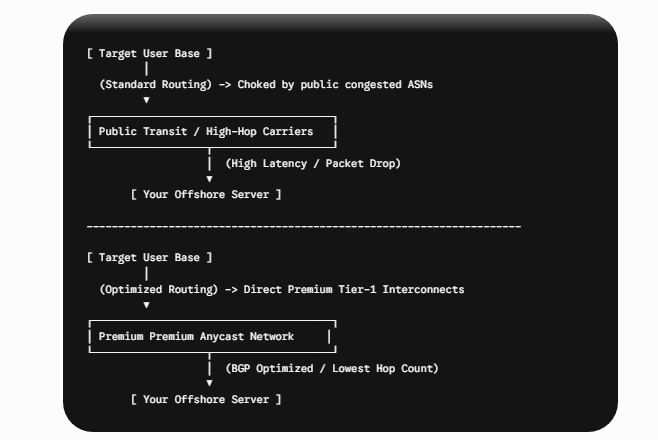
Reduce Latency with Better Network Routing
When choosing or setting up an offshore server, audit your provider’s mix of upstream carriers. Cheap offshore hosts save money by choosing low-priority transit lines. These lines can route packets through unnecessary autonomous systems (ASNs).
- Enforce Tier-1 Carrier Paths: Ensure your provider peers directly with Tier-1 carriers such as Cogent, NTT, Telia, or Tata Communications.
- Before moving to more advanced network optimizations, consider deploying a self-hosted Anycast proxy network. If your backend budget allows, use a network of low-cost proxy frontend nodes positioned close to your users. These proxies terminate connections locally, compress traffic, and pass it back to your primary backend host via persistent, optimized GRE tunnels or WireGuard links. This tricks the client’s browser into completing the TCP handshake instantly, neutralizing the perception of geographic lag.
Optimize the Linux Kernel for Better Performance
The default network configuration profiles in standard Linux distributions (such as Ubuntu Server or Debian) are tuned for localized workloads in corporate data centers. They are completely unsuited for handling high-volume packets passing through high-latency international pipelines.

Tuning the Linux Network Stack
To prevent your remote server’s network pipes from bottlenecking under heavy parallel traffic, add these custom kernel tuning parameters directly to your /etc/sysctl.conf asset:
# Maximize the system-wide core receive and send socket buffer sizes
net.core.rmem_max = 67108864
net.core.wmem_max = 67108864

# Set maximum memory thresholds for individual TCP sockets (min, default, max allocations in bytes)
net.ipv4.tcp_rmem = 4096 87380 67108864
net.ipv4.tcp_wmem = 4096 65536 67108864

# Increase the max number of incoming packets waiting in the network interface queue
net.core.netdev_max_backlog = 10000

# Elevate the system-wide limit for maximum open concurrent connection allocations
net.core.somaxconn = 65535

# Enable TCP Fast Open (TFO) to allow data insertion directly inside the initial SYN packet
net.ipv4.tcp_fastopen = 3
Upgrading the Congestion Control Algorithm to BBR
Older Linux systems use CUBIC, which can cut throughput by up to 50% when packets are lost even when the loss is just noise on international routes.
Switch to BBR (Bottleneck Bandwidth and RTT), a modern algorithm developed by Google. BBR’s main advantage is that it provides more stable and consistent network speeds by measuring actual network capacity, allowing for high throughput even over highly unstable transit routes.
Run these entries to override CUBIC and initialize BBR:
# Set the default queuing discipline to Fair Queueing
sudo sysctl -w net.core.default_qdisc=fq

# Swap the primary congestion algorithm to BBR
sudo sysctl -w net.ipv4.tcp_congestion_control=bbr
High-Performance Web Server Tuning (Nginx Optimization)
Your web server layer must be optimized to minimize connection setup times and stream assets with zero context-switching overhead. If Nginx is bottlenecked at the worker thread tier, your hardware advantages vanish.
user nginx;
# Automatically scale worker processes to match your physical CPU core count
worker_processes auto;
worker_rlimit_nofile 1048576;

events {
    # Maximize individual worker connection capacities
    worker_connections 65535;
    # Enforce epoll processing logic for rapid event execution loops on Linux
    use epoll;
    # Accept multiple connection inputs concurrently per event loop trigger
    multi_accept on;
}

http {
    # Optimize standard zero-copy filesystem data operations
    sendfile on;
    tcp_nopush on;
    tcp_nodelay on;

    # Keep administrative connection overhead lines open longer to mitigate continuous SSL handshakes
    keepalive_timeout 65;
    keepalive_requests 10000;

    # Implement localized HTTP cache parameters to lower origin database lookups
    open_file_cache max=200000 inactive=20s;
    open_file_cache_valid 30s;
    open_file_cache_min_uses 2;
    open_file_cache_errors on;

    # Enable modern HTTP/2 and HTTP/3 support on servers
    # Server blocks below will handle individual site routing maps
}
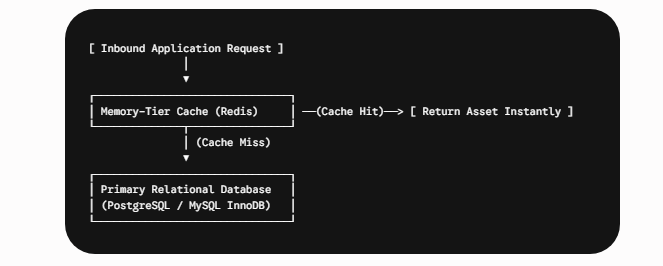
Database Sharding and Persistent Cache Stratification
When application workloads communicate over long distances, making direct read/write database requests for every user transaction is fatal to application performance. You must cache everything close to the memory boundary.
Storage Subsystem Hardening: Optimizing NVMe Arrays
If your offshore server processes intensive file transfers, massive streaming objects, or large database tables, standard disk configurations will introduce an I/O bottleneck. To address this, you need to verify that your operating system handles block storage with minimal write degradation.
Tuning the Mount Options for Performance
Run high-volume databases. Modify your file allocation mapping array in /etc/fstab to disable unnecessary file access logging by using the noatime option. Prevent thousands of extraneous write operations on your NVMe storage arrays by eliminating access record writes.
# Example optimized fstab partition mapping configuration
UUID=your-nvme-uuid-string /ext4 noatime,nodiratime,barrier=0,data=writeback 0 1
Infrastructure Assessment Matrix: Benchmarking Server Speed
Before moving your digital applications to production, benchmark your platform using this specialized engineering framework.
| Verification Layer | Engineering Optimization Target | Status |
| Congestion Control | Has the default Linux congestion algorithm been completely migrated from CUBIC to Google BBR? | [ ] Active / [ ] Pending |
| Worker Limits | Are Nginx configuration open-file descriptors scaled past 1,000,000 limits? | [ ] Active / [ ] Pending |
| Memory Buffer | Have the network-layer socket read and write allocations exceeded the 60MB threshold? | [ ] Active / [ ] Pending |
| Storage Optimization | Is the primary partition configured to bypass write-heavy timestamp tracking via noatime rules? | [ ] Active / [ ] Pending |
FAQs
Why Is My Offshore Server Slower Than My Local Cloud Server?
The main slowdown is not hardware, but network distance. Standard hyper-scalers use local hubs near users. Offshore servers, located in privacy-friendly regions, force your data to pass through additional overseas nodes, increasing latency. To avoid this, use BBR algorithms and local edge caching.
How Does Google’s BBR Improve Network Performance?
Legacy Linux network profiles rely on the CUBIC algorithm, which treats every single drop in packet delivery as an indicator that the local network is overloaded. It responds by slashing transmission speeds to protect stability. BBR isolates true network bottlenecks by analyzing actual bandwidth delivery speeds, regardless of random data loss, keeping your data throughput at peak capacity over long-distance transit lines.
Is It Safe to Modify sysctl.conf for Performance Tuning?
Scaling socket memory allocations up allows your operating system to handle massive, high-throughput traffic pipelines smoothly. However, if you allocate massive core limits to a minimal server configuration that lacks sufficient RAM, the operating system can run out of memory during traffic surges, triggering the Linux OOM Killer. Always match your sysctl buffer sizes to your available physical RAM resources.
Why Should I Choose Tier-1 Network Providers?
Budget transit networks utilize long, indirect routing paths that bounce your traffic through multiple intermediate public networks to keep their data costs down. Each added network hop increases latency and raises the risk of packet drops. Opting for direct Tier-1 network connectivity ensures your offshore server communicates over major global pipelines, providing the cleanest, most direct path to your target audience
Conclusion: Engineering Resilience and High Availability
Offshore Dedicated Servers offer privacy and independence. But achieving high performance requires optimizing network architecture; default settings and raw CPU can’t overcome global latency.
True platform resilience relies on a well-designed network and systems strategy: replacing outdated congestion profiles with high-speed BBR logic, scaling up Nginx worker allocations, implementing database memory-caching frameworks, and tuning disk write profiles. Take control of your underlying infrastructure variables. By eliminating network bottlenecks at the system kernel layer, you can keep your secure data environments fast, reliable, and completely accessible under heavy international traffic loads.
Latest Post