
Introduction
When web operations migrate workloads to offshore hosting, they usually optimize for structural advantages: ironclad data privacy, aggressive freedom-of-speech protections, or immunity from arbitrary, automated DMCA takedown requests. But behind the marketing glossaries of top-tier offshore data centers lies a technical vulnerability that causes production applications to fail more frequently than any physical hardware fault or runtime error DNS resolution failure.
A server can be online, its NVMe arrays reading flawlessly, and its CPU using less than 5%, yet to the rest of the public, the platform simply does not exist.
Standard cloud architectures, such as AWS Route 53 and Google Cloud DNS, rely on highly centralized, Western-regulated infrastructure. They automatically manage geographic routing propagation. In true sovereign offshore dedicated hosting environments, engineers must handle their own DNS topology. If your nameservers are poisoned, incorrectly cached, or targeted by localized BGP routing shifts over borders, your platform goes offline.
If your users can’t resolve your domain’s IP address, your data sovereignty status is irrelevant.
Satisfying Google’s core quality guidelines means skipping surface-level introductory text. As an infrastructure strategist and senior technical copywriter, I am going to break down the exact technical mechanisms behind offshore domain resolution drops, how to debug toxic propagation leaks, and how to build a highly resilient, uncensorable distributed nameserver topology.
1. The Triad of Offshore DNS Failures: Why Your Domain Goes Dark
To fix a broken resolution chain, you must understand how international boundaries and non-standard registrars alter classic DNS logic. When an offshore site stops resolving, it almost always drops into one of three structural failure categories.
Failure Vector A: DNS Cache Poisoning and Regional TLD Hijacking
Many privacy-conscious platforms use specific top-level domains (TLDs).is (Iceland), .ch (Switzerland), .to (Tonga), or .ly (Libya) because their registries resist arbitrary Western domain seizures.
However, local regional internet service providers (ISPs) in highly regulated countries frequently engage in DNS cache poisoning or local zone override at their resolver tier. They intercept queries for your domain and inject a synthetic NXDOMAIN (Non-Existent Domain) status or route the traffic to a local loopback IP, effectively making your site inaccessible within their borders while the rest of the world sees it as perfectly functional.
Failure Vector B: Registrar-Level Hold (The Silent Freeze)
If you purchase your domain through a standard US- or EU-based registrar but point the A records directly to secure offshore hosting infrastructure, you create a massive organizational weak point.
The moment a regulatory body or legal entity sends an unverified complaint to a legacy registrar (a company authorized to manage domain name registrations), they will not contact you. They will quietly apply a status flag to your domain registry entry:
- clientHold (the domain is put on hold at the request of the client)
- serverHold
When this flag is set, the registry drops your nameserver delegations from the global TLD root zone files. Your offshore hosting provider hasn’t failed; your server remains fully active. However, the master pointer map has been systematically deleted at the registrar level.
Failure Vector C: Asymmetric International Propagation and BGP Flapping
Offshore data centers often use localized upstream bandwidth transits to maintain legal autonomy. When your nameservers publish new zone records, those changes must move through complex global Autonomous Systems (ASNs).
If an upstream transit carrier experiences BGP route flapping or packet loss over transatlantic subsea cables, your DNS packets can get trapped in an asymmetric routing loop. One half of the globe resolves the old IP asset. The other half times out completely during the UDP handshake.
2. Advanced Diagnostic Protocols: Tracking the Resolution Break
Never trust local browser tabs or standard system diagnostic utilities when testing an offshore environment. Local machine caches hide real configuration errors. Use raw command-line tools to trace the exact information hierarchy from the root down.
Step 1: Querying the Authority Chain via DIG Tracing
Open your administrative terminal and execute an authoritative trace query. This forces your machine to skip your local ISP’s cache. It connects directly to the global root nameservers, step by step.
dig +trace +additional A offshorededicatedservers.comAnalyzing the Execution Stream:
- The Root Zone Level: The output should show your query reaching the global root servers the main DNS servers on the internet that initiate the process of resolving your requested domain for example, a.root-servers.net.
- The TLD Level: The root servers then forward the request to the authoritative registries for your domain’s top-level domain (such as .com or .is). These registries manage all domains under their specific extension.
- The Authoritative Level: The TLD registries provide details that point directly to your offshore hosting provider’s nameservers.
Diagnostic Core Rule: If the DNS trace fails at Step 2 and shows an empty authority section, it means your domain registrar (the company you purchased your domain from) has suspended your domain using a clientHold lock (a status that stops your domain from working). If the failure occurs at Step 3, it means your nameservers are online but are deliberately refusing or blocking incoming DNS requests on UDP Port 53.
3. Resolving the Registrar Lock and Bypassing Local ISP Blocks
If your diagnostics indicate that your asset is filtered or locked, execute an immediate infrastructure relocation.
Step 1: Auditing WHOIS Registry Status
Run a raw terminal WHOIS query aimed at your domain’s key status codes or flags (WHOIS queries check public records to show domain status and ownership information).
whois offshorededicatedservers.com | grep -E -i "status|hold"Step 1: Auditing WHOIS Registry Status
Run a raw terminal WHOIS query specifically targeting your domain’s core structural flags:
whois offshorededicatedservers.com | grep -E -i "status|hold"If you see Domain Status: clientHold, you cannot fix this with server settings. You must migrate the domain asset right away. Choose a non-jurisdictional, privacy-first offshore registrar. Ensure it honors only requests validated locally, not those from foreign administrations.
Step 2: Bypassing Regional ISP DNS Poisoning via Alternate Records
If the domain is clean globally but blocked regionally, some users cannot access it. This happens because of local ISP DNS overrides. To fix this, set up DNS over HTTPS (DoH) or DNS over TLS (DoT) for key application endpoints.
You can also add a TLSA Record (DANE) in your zone file. This links your TLS/SSL certificate to your domain configuration. It prevents third-party resolvers from removing encryption or changing your IP routes.
# Example TLSA Record to prevent regional resolver spoofing
_443._tcp.offshorededicatedservers.com. IN TLSA 3 0 1 2c26b46b68ffc68ff99b453c1d30413413422d706483bfa0f98a5e886266e7ae
4. Building a Hardened, Self-Hosted DNS Topology on Linux
Relying on a hosting provider’s generic default nameservers is an operational hazard for privacy-centric platforms. To ensure absolute control over your traffic distribution, you should build and deploy your own private, self-hosted nameserver environment using Bind9 on isolated Linux instances.
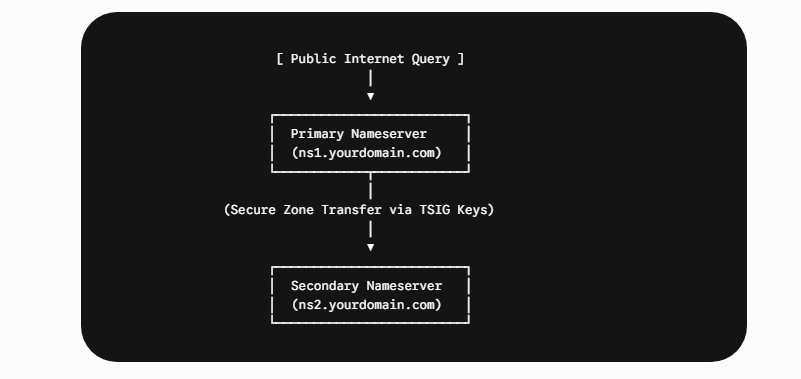
5. Preventing Dynamic Exploits: Implementing TSIG Transactions
If an adversary compromises or intercepts your zone data synchronization pathways between your master and slave nameservers, they can inject malicious routing fields. To prevent this in a decentralized offshore hosting network, you must enforce TSIG (Transaction Signatures) cryptographically for all internal zone transactions.
tsig-keygen -a HMAC-SHA256 offshore-transfer-keyFAQS
Why is my domain accessible via public VPNs but completely invisible from my local connection?
This behavior points directly to localized DNS cache poisoning or regional Deep Packet Inspection (DPI) filtering implemented by your local internet service provider (ISP) or national gateway firewall.
Because offshore servers are located in jurisdictions that leverage privacy frameworks, some standard residential ISPs or national firewalls apply deep packet inspection (DPI) to drop traffic directed to those specific IP blocks. Using a secure intermediate VPN or proxy changes your routing entry point, bypassing the local network block.
What should I do if a misconfigured UFW or iptables rule cuts off my SSH access?
Do not reboot the server from your provider’s standard power panel, as this could corrupt active data tables. Instead, log in to your account dashboard and launch the out-of-band IPMI or VNC console. This connection utilizes an independent internal video/serial interface that operates below the software firewall layer, allowing you to run flushing commands safely.
How can I distinguish between a massive DDoS attack and a localized server crash?
Execute a standard network traceroute from a terminal outside your network environment. If the packet successfully hops through major international transit hubs and only times out within the host data center’s boundary routers, the network pipeline is active, but the server is likely experiencing a kernel crash or an automated anti-DDoS null-route protection freeze.
What is a Linux OOM Killer, and how does it make a server unresponsive?
The Out-of-Memory (OOM) Killer is an automated protective kernel subsystem. When your server completely exhausts its physical memory (RAM) and swap space due to heavy traffic or high query volume, the kernel terminates active processes to keep the core OS alive.
If a critical network thread or system link is selected for termination, your host remains powered on but completely refuses external network requests.
Conclusion: Uptime and Sovereignty Are Non-Negotiable
Deploying websites, databases, or enterprise platforms on Offshore Dedicated Servers provides unmatched data privacy, corporate flexibility, and robust insulation against arbitrary content takedowns. However, routing traffic across multiple international data networks demands a systematic, proactive approach to system administration.
When an unexpected access failure occurs, resolving the issue quickly depends on logical troubleshooting to isolate transit blocks, use out-of-band hardware infrastructure tools to bypass software errors, and optimize kernel variables before resource depletion occurs.
By keeping core administration management pipelines isolated within private WireGuard networks, tuning your Linux configuration templates against kernel panics, and thoroughly testing out-of-band remote access panels, you create an unshakeable digital footprint. Do not wait for a critical transit block or system freeze to compromise your operations—harden your network topography today.
Latest post