
Introduction
Infrastructure architects and system administrators experience a unique kind of panic when production deployments go offline. A ping returns “request timed out,” and the web application refuses connections.
When your infrastructure sits inside a local hyperscaler cloud like AWS or Google Cloud, an outage usually means a localized zone degradation a service slowdown in a specific area or a faulty deployment script an error in the automation code that sets up servers but when you migrate workloads to offshore dedicated servers for privacy, uncensored data sovereignty, or DMCA mitigation, an inaccessibility crisis introduces a much more complex matrix of failure vectors: infrastructure blockades, international routing collapses breakdowns in how data paths are set globally, dynamic BGP blackholing, or silent upstream transit filters.
If your platform goes dark, your data protection policies are useless. Uptime is the ultimate prerequisite for security.
Satisfying Google’s strict search quality guidelines means skipping surface-level platitudes like “check your power cord.” As an infrastructure strategist and technical writer, I will provide a deep, highly structured troubleshooting blueprint to diagnose, bypass, and prevent structural access failures on your offshore network architecture.
1. The 60-Second Triage: Isolating Network vs. Compute Failures
Before changing configuration parameters or modifying firewall tables, you must isolate exactly where the communication chain is broken. Is the server dead, or is the path to the server blocked?
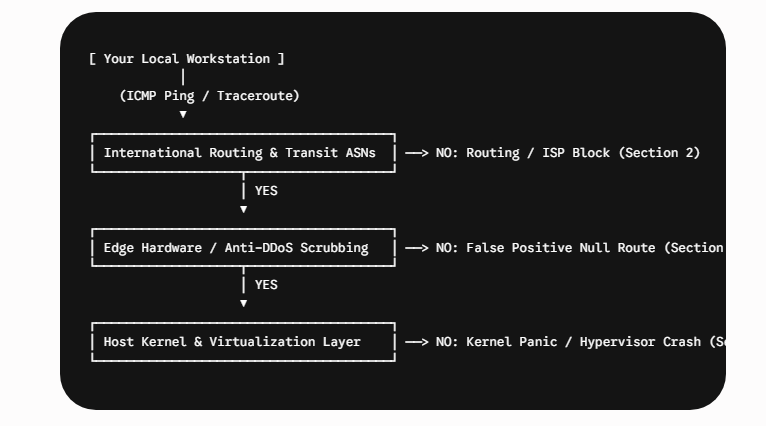
Execution Step: The Layer 3 Verification
Open your local terminal and execute an ICMP traceroute directly to your server’s public gateway IP address. Do not use standard web browsers, as local browser caching can mask real network errors.
For Linux/macOS:
traceroute -I offshorededicatedservers.comFor Windows:
tracert offshorededicatedservers.comDiagnosing the Output:
- The Hop Drops Globally: If the trace fails at an intermediate hop belonging to a Tier 1 telecom provider (e.g., Telia, Cogent, Level 3) before it even enters the offshore jurisdiction’s domestic network, you are dealing with a deep infrastructure routing issue or an international upstream transit block.
- The Hop Drops at the Last Mile: If the traceroute reaches the data center’s boundary routers but times out immediately afterward, the server hardware is likely online, but a local hardware firewall or an automated DDoS mitigation network is actively dropping your specific IP address block.
2. Overcoming Upstream Transnational Blocks and Geo-IP Restrictions
Because offshore servers are routinely located in specific target countries (e.g., Iceland, Switzerland, Panama, Malaysia) to leverage favorable regulatory frameworks, local regional internet service providers (ISPs) or government firewalls occasionally implement localized route poisoning or deep packet inspection (DPI) blocks.
The Problem: BGP Route Leakage and AS Poisoning
Sometimes your server hasn’t crashed; instead, the Autonomous System Numbers (ASNs) handling your server’s routing tables are experiencing an administrative or political block. Local state-level firewalls or major residential providers can mark specific offshore ASNs as malicious, completely dropping packets at their edge.
The Immediate Fix: BGP Validation via Global Looking Glasses
Do not rely on your own network terminal to confirm an outage. Use an open-source global networking utility or a public BGP Looking Glass (such as lookingglass.level3.net or RIPE NCC tools) to test connectivity from various points across the planet.
If the looking glass shows that your server is perfectly accessible from Amsterdam and Tokyo, but timing out completely from your local domestic office, your infrastructure is fully operational. Your local ISP is dropping the route.
Action Plan to Force Access:
- Establish an Out-of-Band SSH Tunnel: Use an intermediate proxy server in a completely neutral location (e.g., a standard VPS in Frankfurt) to serve as a bridge hop to your main target host.
- Utilize an IP-Literal Connection: If your primary nameserver domain is failing due to DNS poisoning at your local ISP level, bypass the domain layer entirely and connect directly to the raw IPv4/IPv6 address via a secure, non-standard port.
3. Resolving Automated Anti-DDoS False Positives and Null Routing
Most premium offshore providers protect their customers by deploying large inline hardware scrubbing arrays. However, if your workstation or automated software scripts generate excessive, rapid connection requests, the automated security system might misidentify your administrative session as a Distributed Denial of Service (DDoS) attack.
The Mechanism of a Null Route (Blackholing)
When a network trigger is tripped, the host’s border routers inject a static route entry that points the target IP address to a null interface (/dev/null). All inbound traffic to that address is instantly dropped at the network edge to protect the overall rack stability.
Step-by-Step Restoration Protocol
If you cannot access your control interface after a security sweep, take these steps directly:
- Step 1: Change Your Local Administrative Point of Origin. First, disconnect your current network interface from the usual gateway. Next, connect through an encrypted mobile network or use a clean, isolated tunnel to obtain a new public IP address. After connecting, check if the management console loads. If it does, your work IP block has been temporarily banned by the firewall.
- Step 2: Access via Out-of-Band VNC/IPMI Console. Use the alternative IP address to log in to your provider’s management panel. Go to the hardware infrastructure console and launch the native IPMI or VNC system to access your server.
This will create an isolated, out-of-band serial connection. You will connect directly with the video card and keyboard controller of your server, bypassing standard network and operating system firewalls.
4. Fixing Operating System Crashing and Kernel Failures
If your out-of-band IPMI tool opens but shows a completely unresponsive terminal, your system is experiencing an active operating system failure, system memory depletion, or a kernel panic.
Resolving the Linux OOM (Out Of Memory) Killer Freeze
When an intensive process (such as a high-volume database query or an unoptimized web application process) consumes all available physical RAM and swap space, the Linux kernel invokes the OOM Killer to prevent a total hardware failure. If it inadvertently targets a critical network process, the server stays powered on but becomes entirely unreachable over SSH.
Key Takeaways: To troubleshoot connectivity and server failures, determine whether the problem is global, last-mile, or due to ISP filtering. Use out-of-band access methods and alternative connections when facing blocks or null routing. Review system logs for resource issues if the OS is unresponsive. Always validate reachability from multiple regions before escalating.
sudo dmesg -T | grep -i -E 'oom[-_]killer|out of memory'5. Rebuilding Corrupted Local Firewall Configurations
A simple syntax error inside your local server firewall settings (iptables, nftables, or UFW) can permanently lock you out of your secure network deployment.
How to Cleanly Flush Corrupted Rules Over VNC/IPMI
If an accidental command has dropped your inbound management configurations, open your IPMI virtual console and execute an entry-level reset sequence to safely flush the rules without resetting the physical host.
For modern Netfilter systems (nftables):
# Create a temporary backup of the existing active ruleset
sudo nft list ruleset > /tmp/corrupted_ruleset.bak

# Completely flush the current operational tables to restore open administration access
sudo nft flush ruleset
6. Proactive Prevention: Securing Long-Term Accessibility
True network reliability requires a resilient, fault-tolerant infrastructure plan. If you want to ensure that your platform on offshore servers remains permanently available under adverse network conditions, implement this preventive architecture.
Action Item 1: Set Up an Automated Rescue Environment
To set up an automated Rescue Environment, identify whether your infrastructure provider supports PXE network booting. Configure a Rescue OS Boot Layer to enable your server to boot into a live Linux environment in the event of a primary OS failure. Use this layer to extract vital application databases and rebuild storage partitions as needed.
Action Item 2: Build a Redundant Management WireGuard VPN
In summary, prioritize establishing a disaster-recovery and secure management environment via a redundant WireGuard VPN to protect critical infrastructure assets and ensure reliable access.
7. Operational Audit Checklist: Is Your Offshore Server Protected?
Ensure your deployment topology is secure by verifying it against this actionable technical checklist before potential infrastructure disruptions occur.
| Architecture Layer | Security Action Item | Current Status |
| Out-of-Band Access | Have you securely tested and verified your IPMI/VNC console credentials within the last 30 days? | [ ] Verified / [ ] Pending |
| Automated Recovery | Is your core system configured to execute an automatic hardware reboot within 10 seconds of a kernel panic? | [ ] Active / [ ] Inactive |
| Firewall Safeguards | Do your automated firewall installation scripts incorporate an automated fallback safety routine? | [ ] Configured / [ ] Unprotected |
| Alternative Routing | Do you maintain an active, off-site monitoring target to instantly identify regional upstream ISP route drops? | [ ] Configured / [ ] Unprotected |
8. Frequently Asked Questions (FAQs)
Why is my offshore server accessible via VPN but completely inaccessible from my home network?
This scenario indicates a local network block or a local ISP routing restriction. Because offshore servers are located in jurisdictions that leverage privacy frameworks, some standard residential ISPs or national firewalls apply deep packet inspection (DPI) to drop traffic directed to those specific IP blocks. Using a secure intermediate VPN or proxy changes your routing entry point, bypassing the local network block.
What should I do if a misconfigured UFW or iptables rule cuts off my SSH access?
Do not reboot the server from your provider’s standard power panel, as this could corrupt active data tables. Instead, log in to your account dashboard and launch the out-of-band IPMI or VNC console. This connection utilizes an independent internal video/serial interface that operates below the software firewall layer, allowing you to run flushing commands safely.
How can I distinguish between a massive DDoS attack and a localized server crash?
Execute a standard network traceroute from a terminal outside your network environment. If the packet successfully hops through major international transit hubs and only times out within the host data center’s boundary routers, the network pipeline is active, but the server is likely experiencing a kernel crash or an automated anti-DDoS null-route protection freeze.
What is a Linux OOM Killer, and how does it make a server unresponsive?
The Out-of-Memory (OOM) Killer is an automated protective kernel subsystem. When your server completely exhausts its physical memory (RAM) and swap space due to heavy traffic or high query volume, the kernel terminates active processes to keep the core OS alive. If a critical network thread or system link is selected for termination, your host remains powered on but completely refuses external network requests.
9. Conclusion: Uptime and Sovereignty Are Non-Negotiable
Using Offshore Dedicated Servers protects your data and provides your company with greater flexibility and protection against unexpected shutdowns. But routing network traffic through multiple countries requires careful system management. If you suddenly lose access, quickly check where the block occurred, use special hardware controls if needed, and update system settings to prevent resource exhaustion.
By keeping key management tools behind your private network, updating your Linux setup to avoid crashes, and testing your emergency access, you make your system much more reliable.
Latest Post